Podcasting Chair Ergonomics: Support Your Voice Daily
By Owen McKay • 3rd Nov
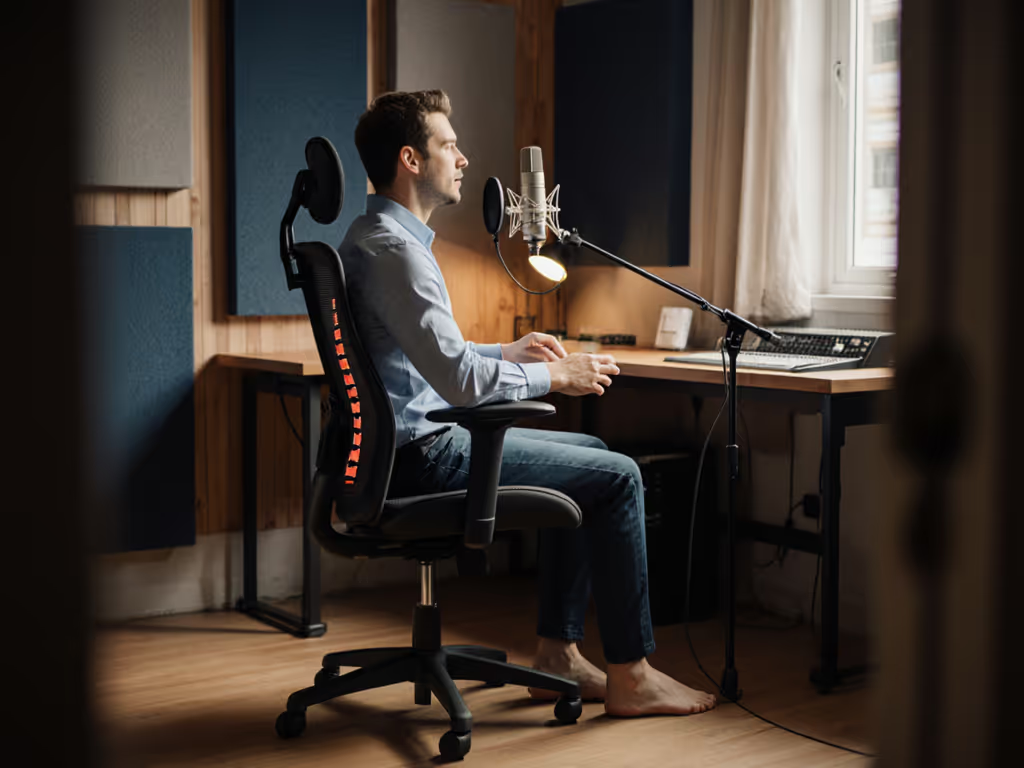
When you're setting up your podcast studio, you've likely invested in quality mics, audio interfaces, and sound treatment, yet your executive ergonomic chair might be the unsung hero affecting your actual performance. Proper podcasting chair ergonomics directly impacts your vocal quality, endurance, and comfort during long recording sessions. That's because how you sit doesn't just affect your back, it shapes your breathing, posture, and ultimately, the clarity and power of your voice. As someone who's helped hundreds of podcasters optimize their setup, I've learned that confidence with controls is half the battle; small tweaks compound into significant comfort and performance gains.
Why Chair Ergonomics Directly Affects Your Voice
Most podcasters focus solely on audio equipment, but overlook how their chair impacts vocal performance. When your spine isn't properly supported, your diaphragm can't function optimally, leading to:
- Shallow breathing that reduces vocal projection
- Tension in shoulders and neck that constricts your voice
- Fatigue that creeps into your delivery during longer sessions
Unlike call center seating solutions designed for constant keyboard interaction, your vocal health workstation needs to encourage an open chest position while allowing subtle movement. Think of it as broadcasting chair ergonomics with performance in mind: your chair should be a silent partner that enhances your presence, not a distraction that undermines it. If you want the why behind these recommendations, explore the spinal motion science that lets your ribcage and diaphragm move freely.
The Five-Minute Fit Assessment: Your First Step
You don't need hours to assess your chair setup. My favorite approach is a time-boxed, stepwise evaluation I developed after a hectic Monday rollout where I had twelve people and twenty minutes to transform their seating. We focused on what matters most for podcasters: For a full walkthrough of adjustments, see our adjustable chair setup guide.
Check Your Foundation (1 minute)
- Feet flat on floor (no dangling or tucking under the chair)
- Thigh clearance: two fingers should fit between the seat edge and the back of your knees
- Hips slightly higher than knees (creates a natural spinal curve)
Evaluate Your Support (2 minutes)
- Lumbar location: support should sit in the small of your back, not your lower ribs
- Chair height: shoulders relaxed, elbows at 90-100 degrees when hands rest on the table
- Armrest clearance: should allow shoulders to drop, not lift them toward your ears
Test Your Movement (2 minutes)
- Recline tension: should allow smooth backward movement without feeling locked or too loose
- Seat stability: minimal side-to-side wobble when pivoting
- Breath check: take three deep breaths. Does your chest feel open and unrestricted?
Small fit tweaks compound into big comfort and focus dividends.

Steelcase Series 1 Office Chair
Essential ergonomics and quality for focused work and productivity.
$499
BIFMA LevelBIFMA LEVEL
BIFMA LevelBIFMA LEVEL
Pros
Weight-activated controls for intuitive support.
Quick 2-minute, tool-free assembly.
Cons
Lumbar support receives mixed feedback from users.
Customers find the office chair easy to assemble, comfortable, and appreciate its adjustable features and solid construction. They like its appearance and consider it worth the price. The lumbar support receives mixed feedback, with some finding it supportive while others say it's lacking. The slide ability is also mixed, with customers noting it rolls easily but moves forward and backward.
Customers find the office chair easy to assemble, comfortable, and appreciate its adjustable features and solid construction. They like its appearance and consider it worth the price. The lumbar support receives mixed feedback, with some finding it supportive while others say it's lacking. The slide ability is also mixed, with customers noting it rolls easily but moves forward and backward.
Step-by-Step: Dialing In Your Podcasting Chair
Step 1: Set Your Baseline Seat Height (90 seconds)
Most podcasters sit too low, which restricts diaphragm movement. Stand beside your chair and adjust the height so the top of the seat is just below your kneecap. When seated, your feet should rest flat with a slight knee bend. This is your starting point, not your final position.
Step 2: Optimize Your Seat Depth (60 seconds)
If you're petite or tall, seat depth makes or breaks your comfort. Sit back fully in the chair. There should be 1-2 inches (about two fingers) between the edge of the seat and the back of your knees. Too much space? You'll slide forward. Too little? You'll lose lumbar support and cut off circulation.
Step 3: Position Your Lumbar Support (75 seconds)
This is where most broadcasting chair ergonomics fail. Learn how correct placement supports a natural spine curve in our lumbar support guide. Adjust the lumbar support vertically until it nestles into the natural curve of your lower back (not your mid-back). Then adjust firmness until you feel support without pressure. Try sitting without support for a moment, then with it, you should feel an immediate lift in your chest.
Step 4: Configure Armrests for Vocal Freedom (60 seconds)
Armrests should allow your shoulders to fully relax downward. Raise or lower them so your elbows rest lightly with upper arms vertical. If your chair has width adjustment, position them so your arms aren't squeezed inward. This subtle shift releases tension that often travels up to your neck and jaw (critical for vocal health).
Step 5: Test Your Recline (75 seconds)
Podcasters need to move! Set your recline tension so you can lean back smoothly with minimal effort. Try speaking while reclined slightly (15-20 degrees). Notice how it opens your chest compared to sitting bolt upright? This gentle recline reduces vocal strain during long sessions while maintaining professional posture.

Maintaining Your Setup Through Long Sessions
The real test of podcasting chair ergonomics comes during extended recording. Use these dynamic sitting techniques to keep your breath and posture fresh across long sessions. Here's how to stay comfortable and maintain vocal quality:
- Set micro-movement reminders every 20 minutes to shift position slightly
- Use a footrest if your feet don't rest flat (this maintains proper hip alignment)
- Check in after your first 30 minutes, as adjustments often need fine-tuning once you're settled
- Consider breathable materials if you tend to overheat, since sweat creates tension that affects your voice
Remember that a voice actor office setup isn't about perfection, it's about dynamic support that allows natural movement while maintaining alignment. Just like athletes fine-tune their stance, podcasters need to find their optimal position through small, intentional adjustments.
Your Actionable Next Step
Don't overcomplicate podcasting chair ergonomics. Before your next recording session, take five minutes to run through this checklist. Start with just one adjustment that feels most off (likely your seat height or lumbar position), and notice the difference in your breathing and vocal ease. Many podcasters report clearer voice quality and reduced fatigue after just these small tweaks.
Confidence comes not from having the "perfect" chair, but from knowing how to make yours work for your body. Whether you're using a high-end executive ergonomic chair or a more modest setup, these accessible adjustments deliver immediate benefits. To align your chair with desk and mic height, follow our ergonomic workstation guide. Last week, a client implemented just the seat depth and lumbar adjustments before recording, and immediately noticed less vocal strain during her two-hour interview.
Your voice is your instrument. Tune your foundation as carefully as you would your microphone. Give yourself permission to experiment, adjust, and find what works for your body. Your listeners will hear the difference.
Try this five-minute fit assessment before your next episode and notice how subtle shifts in your chair create meaningful improvements in your vocal delivery and comfort. Your future self (and your audience) will thank you.
Related Articles